SIM Capture
Light, ad-free, and free screen capture for Windows. Region, window and scrolling capture, screen recording, and text extraction.
No trial period, no locked features, no watermark. Every feature is free, for good.
No ads, no pop-ups, no bundled extras in the app. Just clean captures.
No account, installs in a minute, waits quietly in the tray and opens with one shortcut.
SIM Capture
Download for Windows (installer, 34 MB)Run the installer and follow the steps. No admin rights needed; it adds Start menu and desktop shortcuts.
The program's interface is currently in Korean only. Shortcuts and icons work the same in any language.
Seeing a warning when you download?
SIM Capture is new, so it has few downloads so far and no code signature yet. Browsers and Windows may show a caution warning. It doesn't mean the file has a virus.
- Chrome — If you see 'Suspicious file', click Download suspicious file. If the warning stays in the download list, choose Keep from the menu next to the file.
- Edge — In the download list, click … next to the file → Keep, and if asked again, Keep anyway.
- Windows — If 'Windows protected your PC' appears when you open the installer, click More info → Run anyway.
🔒 Only download the installer from this site (ineedimg.com). Copies posted elsewhere may have been changed.
Screenshots

Features
Install and use
- DownloadGet the installer with the button above.
- InstallRun it and click Install. It takes about a minute.
- RunOpen SIM Capture from the Start menu or desktop. Closing the window keeps it running in the tray.
- CapturePress Ctrl+Shift+1 to start a region capture.
Default shortcuts
| Region capture | Ctrl+Shift+1 |
| Window capture | Ctrl+Shift+2 |
| Full screen | Ctrl+Shift+3 |
| Scrolling capture | Ctrl+Shift+4 |
| Screen recording | Ctrl+Shift+5 |
| Delayed capture | Ctrl+Shift+6 |
| Text extraction | Ctrl+Shift+7 |
You can change shortcuts in Settings (gear icon).
Release notes
1.0.02026-10-30
- First public release
- Region, window, full-screen, scrolling and delayed capture
- Screen recording (MP4), text extraction (OCR), pin to screen
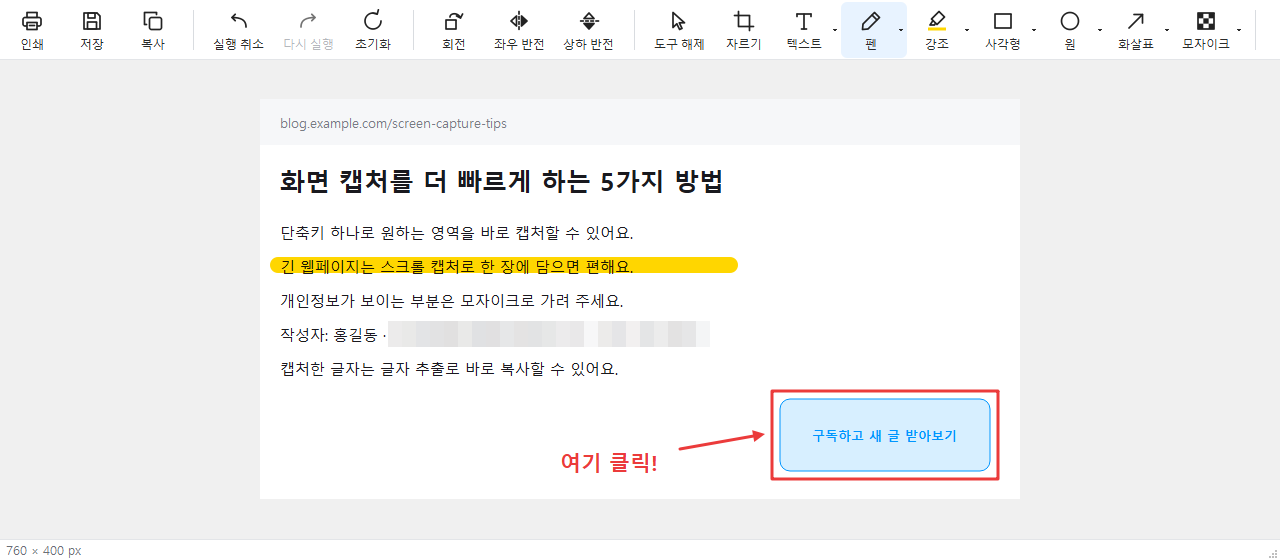
- Editor: pen, highlighter, rectangle, ellipse, arrow, text, mosaic/blur, crop, rotate, flip
FAQ
Is it free?
Yes. It's free, with no sign-up and no ads.
Chrome says the file may be malware.
It's a caution warning shown because the app is new, has few downloads, and isn't code-signed yet. Click 'Download suspicious file' to get it. The warning fades as more people download it.
Windows shows a 'Windows protected your PC' warning.
SmartScreen may warn about new programs without a code signature. Click 'More info', then 'Run anyway'.
Screen recording doesn't work.
Recording needs FFmpeg. Install it with 'winget install Gyan.FFmpeg' in Command Prompt, then restart SIM Capture.
How do I update?
The program tells you when a new version is out. Download the new installer and run it; it installs over the old version and keeps your settings.
How do I uninstall it?
Open Windows Settings → Apps → Installed apps, find SIM Capture and click Uninstall. The program and its settings are removed; your saved captures and recordings stay.
Are my captures uploaded anywhere?
No. Capturing, editing and OCR all happen on your PC. It only reads version info from ineedimg.com to check for updates.
Which Windows versions are supported?
64-bit Windows 10 (version 2004 or later) and Windows 11.
Online image tools
Remove Background
AI removes the background and gives you a transparent PNG.
Compress Image
Shrink file size without visible quality loss — even to a target KB.
Resize Image
Resize to exact pixels or by percentage, in bulk.
Upscale Image
Enlarge small images 2x or 4x with AI, sharply.
Convert Image
HEIC to JPG, and PNG ↔ JPG ↔ WebP in one click.
Crop & Rotate Image
Crop to 1:1, 16:9, passport size — plus rotate and flip.
Blur & Pixelate
Hide faces, plates, and personal info with pixelation or blur.
Blur Faces
AI finds faces automatically and blurs them.
Add Watermark
Add text or logo watermarks to many photos at once.
Thumbnail Maker
Make YouTube thumbnails from templates in minutes.